CloudBlazer is an authorized Nutrient reseller and implementation partner. We license, install, and configure Nutrient Documents for Salesforce so your team can generate, edit, and sign documents without leaving Salesforce.


Authorized Nutrient Partner
Looking for a Nutrient Salesforce partner? CloudBlazer is an authorized Nutrient reseller and Salesforce implementation partner. We sell Nutrient licenses, implement Nutrient Documents for Salesforce, and support your team after go-live, so you have one partner for the whole project.
Most Salesforce teams still build quotes, contracts, and onboarding packets the hard way: export the data, paste it into Word, email PDFs back and forth, and chase signatures in a separate tool. Every hand-off adds errors and delays, and the signed copy often never makes it back to the record.
Nutrient Documents for Salesforce fixes that. It is a Salesforce-native app for Salesforce document generation, PDF and Word editing, markup, forms, and legally binding Salesforce e-signatures, all on the records your team already works in.
Everything your team needs to create, review, and sign documents, built into your Salesforce records, page layouts, and permissions.

Build quotes, proposals, contracts, and certificates from templates that pull data from the record and its related records. Merge fields, repeating sections, and conditional content work without writing queries.

Send documents for legally binding signature right from the record, track signing status, and send reminders, with the signed copy kept in Salesforce.

Edit text in PDF and DOCX files and save in either format, without downloading files or switching applications.

Reorder, crop, delete, or add PDF pages before a document goes out.

Comment on, highlight, and mark up documents for internal reviews and approvals.

Add fillable form fields to signing workflows so customers can complete and sign a document in one step.

Store editable or locked templates in Salesforce, import your existing Word templates, and control who can change them.

Preview PDFs, Office files, and images in a responsive viewer directly on the Salesforce record.

Permanently remove sensitive information from documents inside Salesforce before they are shared.
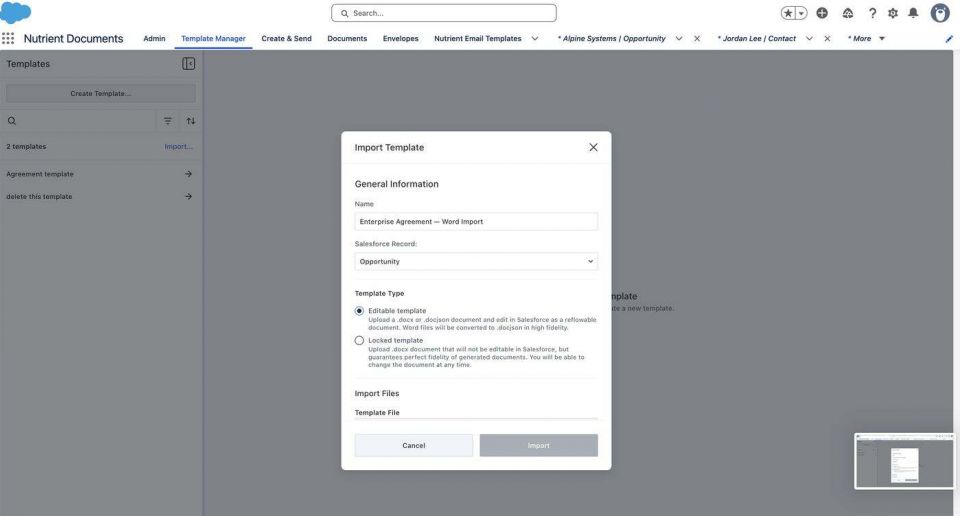
Import your existing Word templates as editable or locked templates, map merge fields to the record and its related records, and generate quotes, agreements, and certificates in a few clicks. CloudBlazer builds and tests these templates for you so the right data lands in the right place every time.
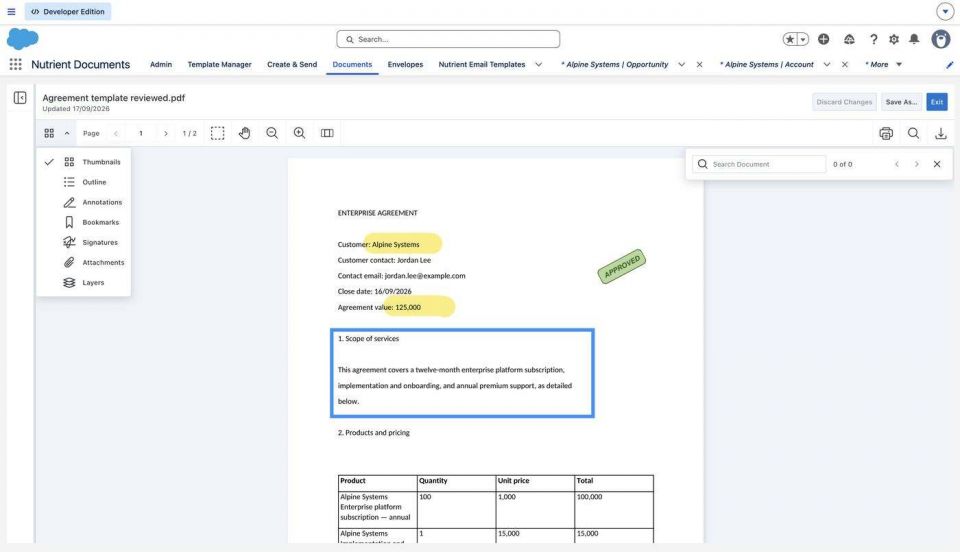
Open generated PDFs and Word files in a built-in document viewer, edit text, highlight terms, add comments and approval stamps, and save the reviewed version back to Salesforce. No downloads, no email attachments, and no version confusion.
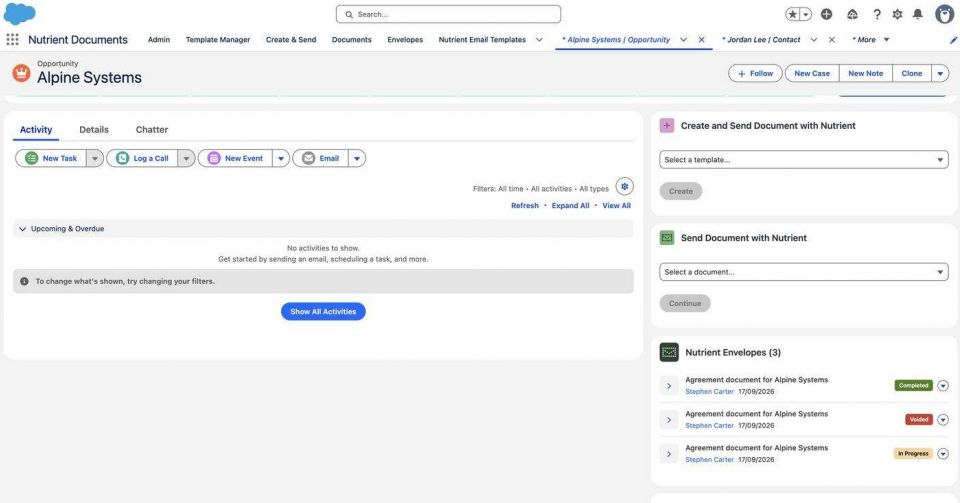
Send documents for legally binding signature from the opportunity, account, or any record. Signing status, from in progress to completed, shows right on the record, so sales and operations always know where a deal stands.
Software is only as good as its setup. CloudBlazer combines Salesforce consulting expertise with hands-on Nutrient experience, and our team has already completed Nutrient implementations for Salesforce customers.
Many Salesforce customers pay for one tool to generate documents and another to collect signatures. Nutrient handles document generation, editing, and e-signature in a single Salesforce-native app, which can mean fewer vendors, fewer integrations, and fewer renewals to manage.
CloudBlazer helps companies move from Conga Composer, DocuSign, Adobe Acrobat Sign, and other document tools to Nutrient. We:
Not sure switching makes sense? We will review your current setup and give you a straight answer.
Every company has a different number of users and document templates, so implementation is billed on a time-and-materials basis. Before any work begins, you receive a line-itemed plan and budget for your approval. Contact us for Nutrient licensing and implementation pricing.
A few of the ways teams use Nutrient for Salesforce:

Generate branded quotes and proposals from opportunity and product data, then send them for signature in one step.
Create MSAs, SOWs, and renewals from approved templates and track signatures on the account.

Assemble onboarding packets and forms that customers can fill out and sign online.

Produce certificates, attestations, and compliance documents from Salesforce data with consistent formatting.

Turn case and work order details into finished reports that customers can review and sign off on.

Send offer letters, NDAs, and partner agreements for signature and keep the signed copies organized.
Nutrient Documents for Salesforce is a Salesforce-native app that lets users generate documents from templates, view and edit PDF and Word files, mark up and annotate documents, fill out forms, and collect legally binding e-signatures directly from Salesforce records.
Yes. CloudBlazer is an authorized Nutrient reseller and Salesforce implementation partner. We sell Nutrient licenses and implement, configure, and support Nutrient Documents for Salesforce.
Yes. CloudBlazer resells Nutrient licenses. Pricing depends on your number of users and your needs, so contact us for a quote.
Implementation is billed on a time-and-materials basis because projects vary by the number of users and document templates. You receive a line-itemed plan and budget to approve before work begins. Contact us for details.
Yes. We help companies replace Conga Composer, DocuSign, Adobe Acrobat Sign, and other document tools with Nutrient, including template rebuilds, testing, cutover planning around renewal dates, and user training.
Nutrient works with PDF files, Word and other Microsoft Office files, images, and text files.
Yes. Nutrient runs natively in Salesforce, so documents are created, edited, and signed inside Salesforce records under your existing Salesforce access controls.
CloudBlazer does. Through our Salesforce Managed Services program, we handle new templates, workflow changes, and user questions, and you pay only for work you approve, with no retainer.
Talk with a CloudBlazer consultant about Nutrient licensing, implementation, or moving off your current document tools. Pricing depends on your number of users and templates, so contact us for details.


